This guide explains how to deal with VEE Port variants. You may need this, for example, if you have the same MCU on two different hardware boards.
In this example, we consider that we have two i.MXRT1170-EVK boards: one connected to a screen in a portrait orientation, and the other in a landscape orientation. We want to have the same VEE Port project for both boards to avoid duplicating the sources, and we want to configure the screen orientation once in the application:
-
We want the right front-panel (portrait/landscape orientation) to be selected automatically.
-
We also want the BSP build modified (with a CMake variable that selects the correct display driver).
The following image shows how to structure an SDK6 project around these VEE Port variants without duplicating the code:
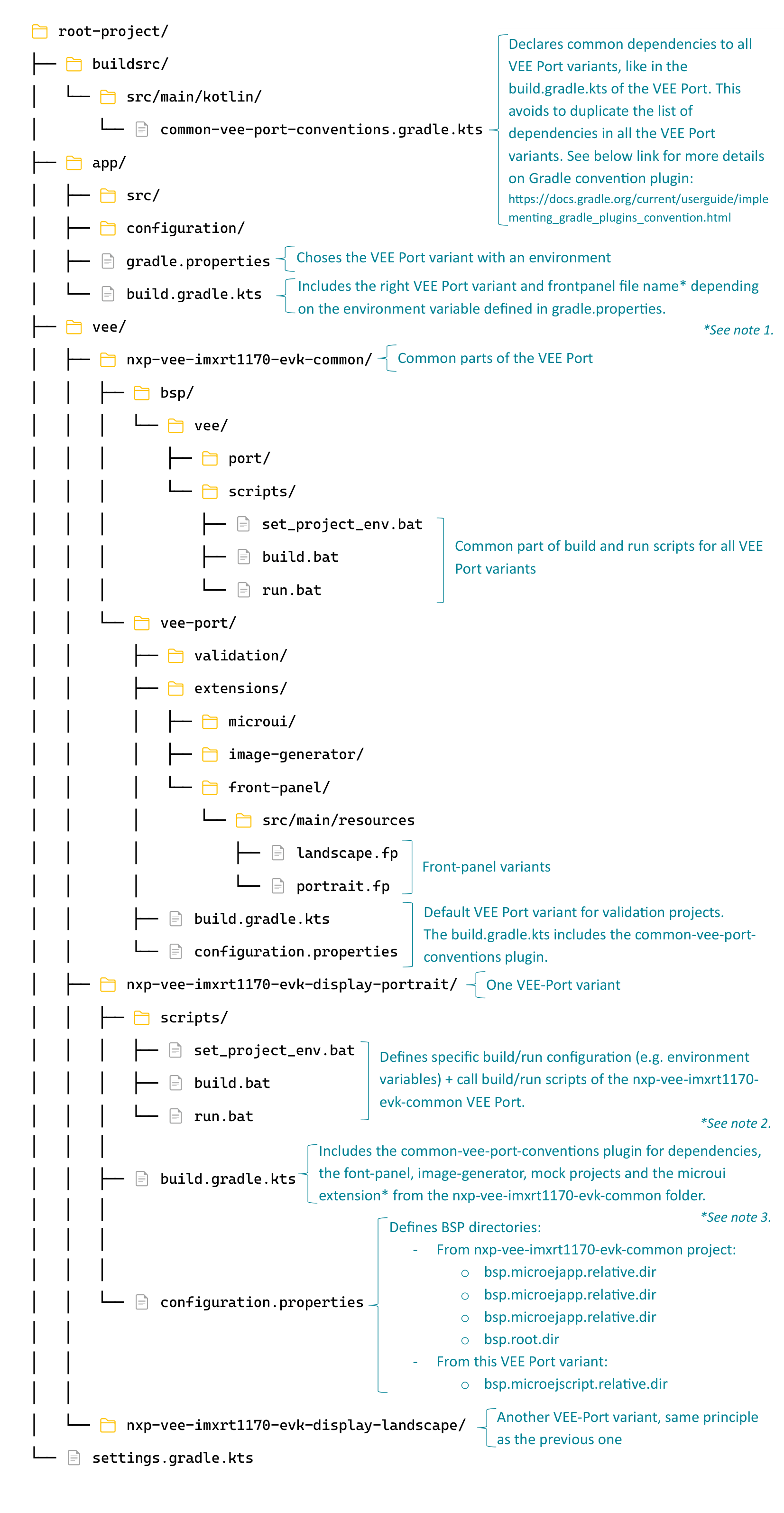
Notes
-
Application project > build.gradle.kts: Define a frontpanel file name
Setting thisfrontpanel.filevariable in thebuild.gradle.kts, instead of theconfiguration.propertiesfile, allows to set a different frontpanel file name based on a Gradle property.import com.microej.gradle.tasks.BuildApplicationObjectFileTask import com.microej.gradle.tasks.BuildVirtualDeviceTask import com.microej.gradle.tasks.RunOnSimulatorTask tasks.withType<BuildApplicationObjectFileTask> { systemProperties.put("microej.option.frontpanel.file", portrait.fp) } tasks.withType<BuildVirtualDeviceTask> { systemProperties.put("microej.option.frontpanel.file", portrait.fp) } tasks.withType<RunOnSimulatorTask> { systemProperties.put("microej.option.frontpanel.file", portrait.fp) } -
VEE Port variant project > scripts: Example of scripts in the Portrait VEE Port variant.
-
set_project_env.bat
REM Define the screen orientation. REM Override the default value of SCREEN_ORIENTATION REM set in set_project_env.bat in the the nxp-vee-imxrt1170-evk-common project SET SCREEN_ORIENTATION=Portrait -
build.bat
REM Set the specific environment variables for the portrait variant CALL "%~dp0\set_project_env.bat" IF %ERRORLEVEL% NEQ 0 ( exit /B %ERRORLEVEL% ) REM Call the common build script that will: REM - define common environment variables (call set_project_env.bat in the nxp-vee-imxrt1170-evk-common project) REM - run the build command CALL "%~dp0\..\..\nxp-vee-imxrt1170-evk-common\bsp\vee\port\scripts\build.bat" IF %ERRORLEVEL% NEQ 0 ( exit /B %ERRORLEVEL% ) -
run.bat
REM Set the specific environment variables for the portrait variant
CALL "%~dp0\set_project_env.bat"
IF %ERRORLEVEL% NEQ 0 (
    exit /B %ERRORLEVEL%
)

REM Call the common run script that will:
REM - define common environment variables (call set_project_env.bat in the nxp-vee-imxrt1170-evk-common project)
REM - run the flash command
CALL "%~dp0\..\..\nxp-vee-imxrt1170-evk-common\bsp\vee\port\scripts\run.bat"
IF %ERRORLEVEL% NEQ 0 (
    exit /B %ERRORLEVEL%
)
-
-
VEE Port variant project > build.gradle.kts: Define an external microui extension folder
If the folderextensions/microuiis not in the default location, the path can be defined in the following way:import com.microej.gradle.tasks.BuildVeePortConfigurationTask tasks.withType<BuildVeePortConfigurationTask> { microuiDirectory.set( project.rootProject.layout.projectDirectory.dir( "<extensions/microui folder dir>")) }
Clotilde for MicroEJ