The Kernel API Generator is a tool that helps to generate a kernel.api file based on a Java classpath:

The following guide explains how to run the Kernel API Generator from a custom Gradle task, using MICROEJ SDK6 ExecTool task.
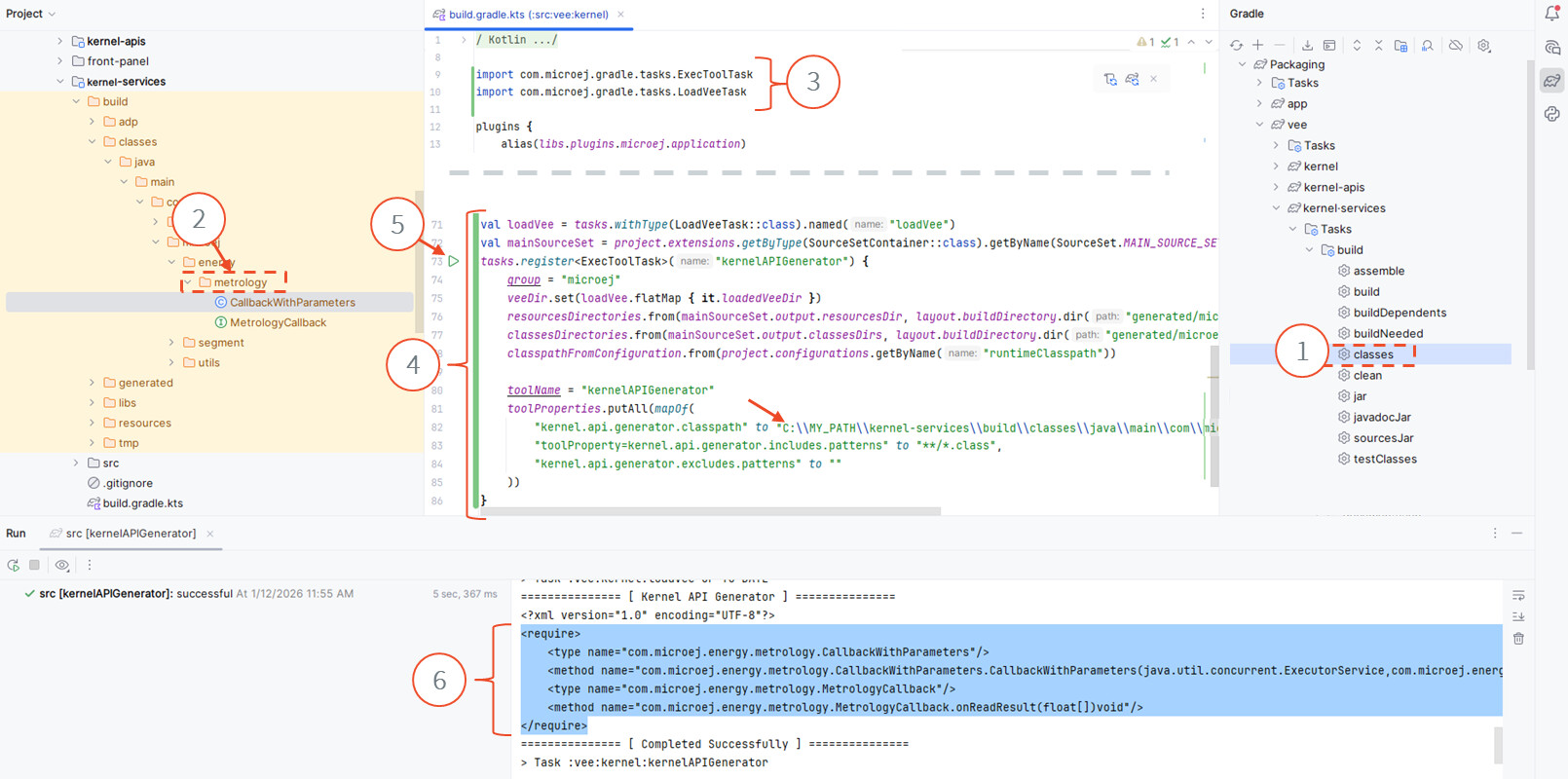
In this example, the APIs present in the metrology package of the kernel-services library will be exposed as Kernel APIs:
-
In the Gradle tasks view, run the
classestask of your project to compile all its Java sources. -
In the Project explorer view, locate the folder containing the classes to be exposed as Kernel APIs.
-
Open the
build.gradle.ktsfile of the kernel project and add the following lines at the beginning of the file:import com.microej.gradle.tasks.ExecToolTask import com.microej.gradle.tasks.LoadVeeTask -
Copy / paste the following code at the end of the
build.gradle.ktsfile of the kernel:val loadVee = tasks.withType(LoadVeeTask::class).named("loadVee") val mainSourceSet = project.extensions.getByType(SourceSetContainer::class).getByName(SourceSet.MAIN_SOURCE_SET_NAME) tasks.register<ExecToolTask>("kernelAPIGenerator") { group = "microej" veeDir.set(loadVee.flatMap { it.loadedVeeDir }) resourcesDirectories.from(mainSourceSet.output.resourcesDir, layout.buildDirectory.dir("generated/microej-app-wrapper/resources")) classesDirectories.from(mainSourceSet.output.classesDirs, layout.buildDirectory.dir("generated/microej-app-wrapper/classes")) classpathFromConfiguration.from(project.configurations.getByName("runtimeClasspath")) toolName = "kernelAPIGenerator" toolProperties.putAll(mapOf( "kernel.api.generator.classpath" to "C:\\PATH\\TO\MY\BUILT\\CLASSES\\FOLDER", "toolProperty=kernel.api.generator.includes.patterns" to "**/*.class", "kernel.api.generator.excludes.patterns" to "" )) }Set the property
kernel.api.generator.classpathto the absolute path obtained during step 2). -
Run the
Kernel API Generatortask using thePlaybutton. -
The
Kernel APIsare printed in the console. Add them to your kernel.api file.
Alex for MicroEJ