Regulations such as the EU Cyber Resilience Act ask device makers to answer a simple question: what software is inside the product, and where does each piece come from? The standard answer is a Software Bill of Materials (SBOM), a list of every component shipped in a product, with its version, its supplier, and its license.
The SBOM generation announcement explains how to produce an SBOM for a MicroEJ Application. This article explains what you find in it: which parts of an Application come from MicroEJ Corp., which come from silicon vendors and open-source projects, and which are yours.
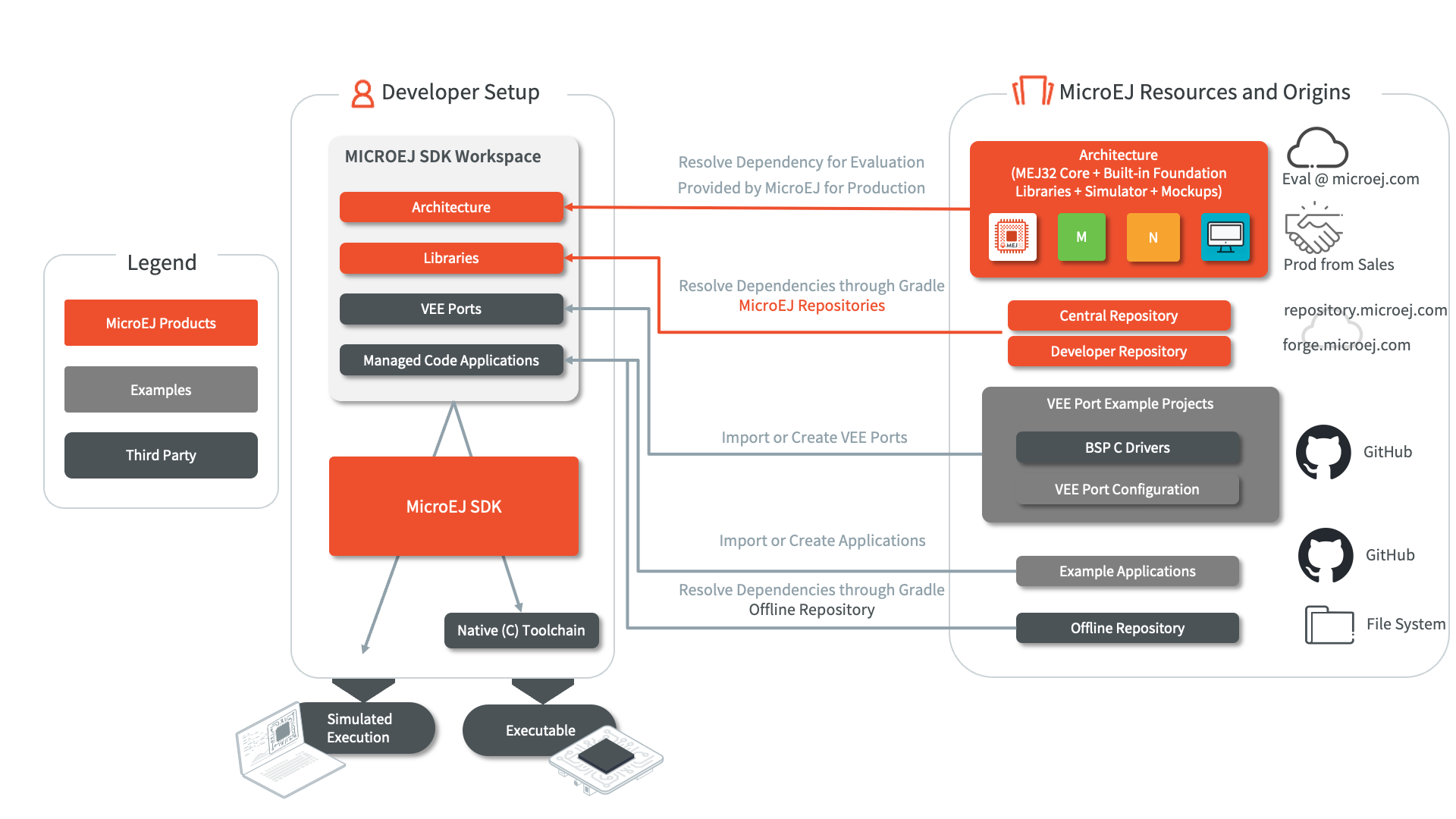
MicroEJ resources and their origins, from the MicroEJ documentation overview
Two Kinds of Code in One Executable
A MicroEJ Executable is the single binary flashed on the device. It links two kinds of code:
- Managed Code: your Application, the Libraries it depends on, and the Foundation Libraries implemented by the VEE Port.
- Native code: the Board Support Package (BSP), which gathers the RTOS, the drivers, the MicroEJ abstraction layers, and third-party C libraries.
MICROEJ SDK 6 allows to analyze the first part through a Gradle configuration named microejSbomClasspath.
MICROEJ SDK 6 also can track the Application’s runtime dependencies and VEE Port components embedded in the Executable: the Architecture, the Packs, and their runtime implementations. An SBOM tool reads a project Gradle configuration and writes an SPDX or CycloneDX document.
A Typical SBOM at a Glance
The table below shows, simplified, the provenance of the components of a UI Application running on an Arm Cortex-M4 VEE Port.
| Component | Example coordinates | Supplied by | Origin | Listed in the Managed Code SBOM |
|---|---|---|---|---|
| Application | com.mycompany:my-app |
Your company | Your version control | Yes, as the root package |
| Architecture | com.microej.architecture.CM4.CM4hardfp_GCC48:flopi4G25 |
MicroEJ Corp. | microej.com (Evaluation) or MicroEJ sales (Production) | Yes |
| Architecture Specific Pack | com.microej.architecture.CM4.CM4hardfp_GCC48:flopi4G25-ui-pack |
MicroEJ Corp. | Central Repository | Yes |
| Foundation Library APIs | ej.api:edc, ej.api:microui |
MicroEJ Corp. | Central Repository | Yes |
| Add-On Library | ej.library.ui:mwt |
MicroEJ Corp. | Central Repository | Yes |
| Incubating Library | Any module of the Developer Repository | MicroEJ Corp. or the community | Developer Repository | Yes, once the module carries a Maven descriptor |
| Company Library | com.mycompany:my-lib |
Your company | Your artifact repository | Yes |
| Abstraction layers, Pack C modules | AbstractionLayer-*, MicroUI C module |
MicroEJ Corp. | GitHub, Packs | No, native code |
| Vendor SDK, RTOS, C libraries | MCUXpresso SDK, FreeRTOS, Mbed TLS | Silicon vendor, open-source projects | Vendor portals, GitHub | No, native code |
Modules published with SDK 6 1.2.0 or earlier carry no license information in their POM file, so their SBOM entries have incomplete license fields. Use module versions published with SDK 6 1.3.0 or later to get complete license information.
Where Each Component Comes From
The overview diagram above shows the origins of everything an Application is built from. Here is what each origin contributes to the SBOM.
Your Application
Your Application is the root package of the SBOM. Its source lives in your own version control, under your license. You declare yourself as its supplier in the SBOM plugin configuration.
The MicroEJ Architecture
The MicroEJ Architecture holds the Core Engine built for one instruction set and one C compiler, the built-in Foundation Libraries (EDC, BON, SNI, KF, and Shielded Plug), and the Simulator. A VEE Port requires exactly one Architecture, and it is supplied by MicroEJ Corp. in two forms:
- An Evaluation Architecture, available from microej.com, to try MICROEJ VEE on a target.
- A Production Architecture, provided by MicroEJ sales, to ship a product.
Both use the com.microej.architecture organization. The Architecture is listed in the SBOM because the Core Engine and the built-in Foundation Libraries ship in the Executable.
The Central Repository
The Central Repository is the module repository distributed by MicroEJ Corp. It contains a selection of production-grade modules, and its content is versioned as a whole with a changelog. The SBOM lists three families of modules from it, recognizable by their organization:
- Packs (
com.microej.pack, andcom.microej.architecturefor Architecture Specific Packs), which extend the VEE Port with features such as graphics, networking, or file system. - Foundation Library APIs (
ej.api,com.microej.api), such as EDC or MicroUI. - Add-On Libraries (any other organization), such as MWT, the widget toolkit.
Each module carries its own LICENSE.txt and CHANGELOG.md. Since version 4.0.0, released on 2026-09-09, the Central Repository is built with SDK 6 1.8.0: every module, including the modules built with SDK 5, now carries the Maven descriptor that SBOM tools read.
The Developer Repository
The Developer Repository hosts community modules provided as-is: demos, incubating libraries, former versions of Central Repository modules, and hardware-specific modules. Each module comes with its own license.
Modules from the Developer Repository appear in the SBOM with their coordinates, so a reviewer can tell them apart from production-grade modules. The Developer Repository does not add Maven descriptors to SDK 5 modules yet. To list such a module in the SBOM, copy it into your own module repository and build that repository with SDK 6 1.8.0 or later.
Your Own Repositories
Before starting production development, MicroEJ recommends importing the modules you use into your own environment, as an offline Module Repository or in your company artifact repository. A module copied this way keeps its organization, name, and version, so its SBOM entry still identifies where it comes from.
Your own Libraries, and the third-party Libraries you publish internally, appear in the SBOM next to the MicroEJ modules. Each one shows the supplier declared in the organization.name field of its published POM file.
VEE Port Examples on GitHub
The MicroEJ GitHub organization hosts VEE Port examples for evaluation boards. A VEE Port example contains two parts with two different provenances.
The VEE Port configuration selects the Architecture and the Packs. It decides which MicroEJ Corp. components the SBOM lists on the VEE Port side.
The BSP gathers native code from several suppliers:
- Abstraction layers, the C code that implements the MicroEJ Low Level APIs on top of an RTOS or a hardware accelerator. MicroEJ Corp. publishes them on GitHub, for example AbstractionLayer-Security-MbedTLS or AbstractionLayer-UI-VGLite, under a BSD-style license.
- C modules of the MicroEJ Packs, such as the MicroUI and MicroVG C modules, supplied by MicroEJ Corp. under the MicroEJ Commercial Software Component License.
- The silicon vendor SDK, such as the MCUXpresso SDK or the ESP IDF.
- The RTOS and the third-party C libraries, such as FreeRTOS, Zephyr, Mbed TLS, FreeType, or HarfBuzz.
When you fork a VEE Port example to build your product, the fork becomes your project and you become the supplier of its configuration. The VEE Port examples ship a LICENSE.txt and a NOTICE.txt that describe the license terms of their third-party components, a useful starting point for the native part of the product SBOM.
Example Applications on GitHub
Example Applications and project templates, such as the Foundation Library examples, are starting points. Once you import one, its source becomes part of your Application: it is not a dependency, so it does not appear as a separate SBOM entry. Its dependencies resolve through Gradle from the repositories described above and appear in the SBOM like any other. The code you copy keeps the terms of the example’s LICENSE.txt.
What the SBOM Leaves Out
The microejSbomClasspath configuration does not include:
- Simulator-only artifacts, such as the Front Panel and the Mocks
- Test code, build tools, and the SDK itself
- Native C code linked by the BSP
The first two items do not ship in the Executable, so they do not belong in a product SBOM. The BSP does ship. A complete product SBOM combines the Managed Code SBOM with an SBOM of the native side, produced by the BSP toolchain (for example, west spdx for Zephyr, or the SPDX output of Yocto for a Linux VEE Port) or assembled from the license and notice files of the BSP components.
Generate It
The setup takes three steps: apply the Gradle SPDX plugin or the Gradle CycloneDX plugin to the Application project, point it at microejSbomClasspath, and run ./gradlew spdxSbom or ./gradlew cyclonedxBom. The Generate the SBOM documentation also shows how to generate the SBOM with every buildExecutable run, and how to publish it next to the Application with an sbom classifier, so that each Application version comes with its own SBOM.
Going Further
- Read the SBOM generation announcement for an SPDX example.
- Follow the Generate the SBOM documentation for SPDX, CycloneDX, and build integration.
- Learn about the Central Repository and the Developer Repository, and how to build your own Module Repository.
- Browse the MicroEJ GitHub organization for VEE Port examples, abstraction layers, and example Applications.
Happy coding!
The MicroEJ Team.